
Download Allway Sync – file sync, folder sync, data sync, automatic sync, sync tool, file management, backup tool, computer sync, file transfer, data backup
Overview
Allway Sync is a specialized productivity tool designed to automate and streamline the process of keeping files synchronized across multiple computers. Its primary purpose is to eliminate the inefficiencies and risks associated with manual file transfers, such as version mismatches, forgotten updates, or duplicated efforts. By enabling automatic synchronization between source and destination folders, the app ensures that users always access the most current version of their documents, photos, and projects, regardless of the device they're using.
Target users include professionals, remote workers, students, and anyone managing files across desktops, laptops, or personal computers. The app is particularly useful for individuals who frequently switch between work environments—home, office, or on the go—requiring consistent access to updated data. It serves as a reliable solution for maintaining data integrity without relying on cloud services or physical storage devices.
Developed by Allway Software, the application focuses on simplicity, security, and accuracy in file synchronization. Although the developer did not provide additional technical details about their background or company history, the app’s functionality suggests a strong emphasis on user-centric design and robust data handling. Real-world use cases include syncing project folders between home and office systems, maintaining consistent personal document libraries, or ensuring that creative assets remain synchronized across multiple workstations.
In the broader app ecosystem, Allway Sync fills a niche for local, secure, and efficient file synchronization. It offers a compelling alternative to cloud-based solutions by prioritizing user control over data, making it a valuable utility for privacy-conscious users and organizations with strict data governance policies.
Key Features & Functionality
Allway Sync delivers a focused set of features centered on reliable and automated file synchronization. These capabilities are designed to reduce user effort while maximizing data consistency and integrity.
- Automatic Folder Synchronization: The app enables users to select a source folder and a destination folder, then initiate synchronization with a single click. Once configured, the software monitors both folders and aligns their contents, ensuring identical copies across devices. This feature is ideal for users who need to maintain consistent project files across multiple computers.
- Intuitive User Interface: With a clean, straightforward layout, Allway Sync simplifies what is traditionally a complex process. Even users without technical expertise can quickly set up synchronization tasks without needing extensive training or documentation.
- Consistent File Integrity: The software ensures that every file transferred remains unchanged during the sync process. This guarantees that edited documents, images, and other assets are replicated exactly as intended, minimizing the risk of data corruption or unintended modifications.
- Secure Data Transfer: Allway Sync prioritizes the safety of user data by maintaining file integrity throughout synchronization. The process is designed to prevent unauthorized access or alterations, making it a trustworthy tool for sensitive or critical files.
- Flexible Use Across Environments: Whether used at home, in the office, or while traveling, the app adapts to various workflows. It supports seamless transitions between devices, allowing users to pick up work from any location without worrying about outdated or missing files.
For example, a freelance designer might use Allway Sync to keep their latest portfolio files updated between a desktop at home and a laptop at a client’s office. Similarly, a student could sync research documents between their school computer and personal device, ensuring access to the most recent version at all times.
Interface, UX & Performance
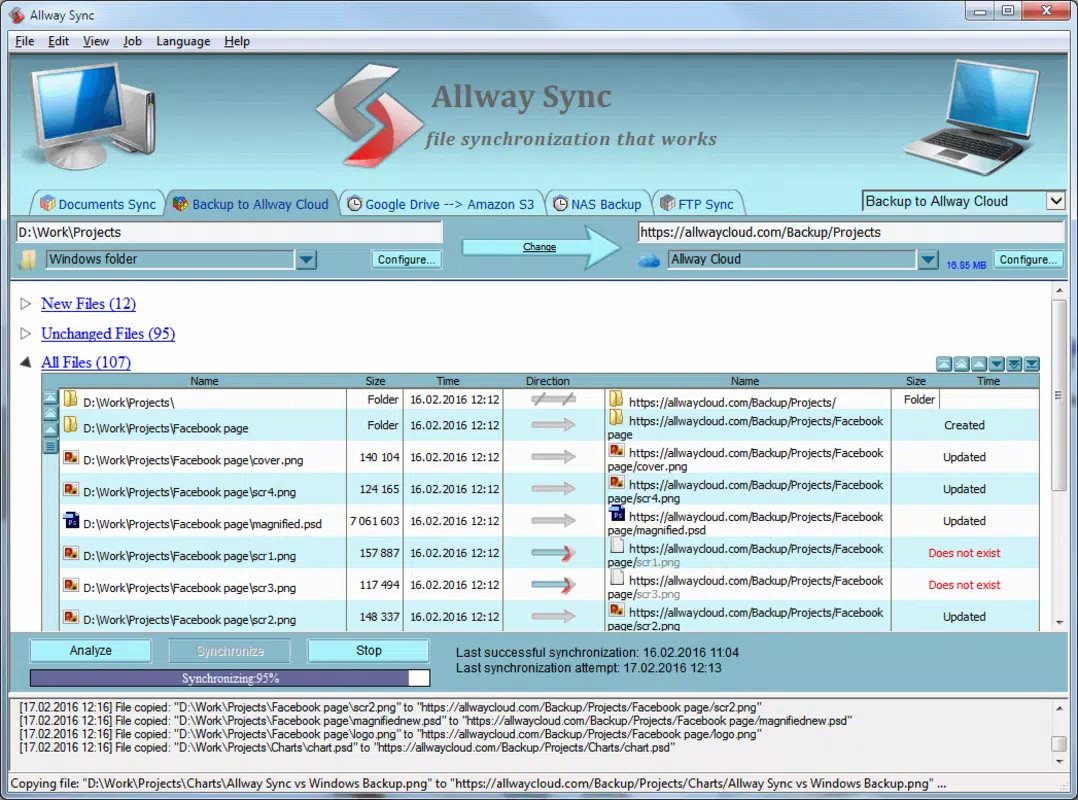
The user interface of Allway Sync is designed with clarity and ease of use in mind. The layout is minimalistic, with clearly labeled sections for selecting source and destination folders, setting synchronization options, and initiating the sync process. Navigation is linear and predictable, allowing users to complete setup tasks in a few simple steps.
Visual design emphasizes functionality over aesthetics, with a focus on readability and task-oriented layout. Buttons are prominently placed, and status indicators provide real-time feedback during synchronization, helping users understand the progress and outcome of each operation.
Although the developer did not list formal performance metrics, the app is reported to operate efficiently on standard Windows systems. It handles folder synchronization with minimal system resource usage, suggesting stable performance across different device categories, including older or lower-spec machines.
Responsiveness is maintained during sync operations, with the interface remaining accessible and non-blocking. Stability appears to be a priority, as the software is designed to complete synchronization tasks without unexpected crashes or data loss. Users can expect consistent behavior across multiple sync cycles, even with large or complex folder structures.
Platform Compatibility & Technical Requirements
Allway Sync is available exclusively for the Windows operating system. The current version is 14.0.0, with a file size of 12.4 MB. This compact footprint suggests a lightweight application that does not impose significant storage demands on the host system.
The developer did not specify minimum OS requirements or compatibility details beyond the platform. As such, users should verify system compatibility with their specific Windows version before installation. It is recommended to ensure that the system meets general software requirements for running Windows-based applications.
Pros and Cons
Pros
- Automated synchronization reduces manual effort and human error.
- Simple, intuitive interface suitable for non-technical users.
- Ensures identical file copies across devices for data consistency.
- Secure transfer process maintains file integrity.
- Lightweight application with minimal system impact.
Cons
- Platform limited to Windows; no support for macOS, Linux, or mobile devices.
- Specific system requirements were not disclosed.
- Price point may be high for casual users or those seeking free alternatives.
- Does not include cloud integration or remote access features.
- Limited to local network or direct connection synchronization.
FAQ
Is Allway Sync safe to use?
Yes, Allway Sync is designed to maintain file integrity during synchronization. It ensures that files are transferred accurately and without modification, minimizing the risk of data loss or corruption.
Can I use Allway Sync on multiple computers?
Yes, the application can be installed and used on multiple Windows computers. Users can configure synchronization between any pair of devices, provided they are connected via a local network or direct connection.
Does Allway Sync require an internet connection?
Not necessarily. The app can operate using local network connections or direct file transfers between devices. However, some advanced configurations may require network access.
Is there a free version of Allway Sync?
No, the current version is a paid application priced at $39.95. There is no publicly available free or trial version mentioned in the provided information.
How often can I sync my folders?
Users can initiate synchronization manually at any time. The frequency depends on user preference and workflow. The app does not include automated scheduling features in the provided details.
Final Thoughts
Allway Sync stands out as a focused, reliable tool for users who need consistent, secure, and automatic file synchronization across Windows-based systems. Its straightforward interface and emphasis on data accuracy make it ideal for professionals, students, and remote workers managing files across multiple devices. While it lacks cross-platform support and cloud integration, its core functionality delivers strong value for those prioritizing local control and data integrity.
For individuals seeking a lightweight, dependable sync solution without relying on third-party cloud services, Allway Sync offers a compelling alternative. Its ability to maintain identical file copies across systems ensures peace of mind and workflow continuity.
Download Allway Sync now


